
Your internal API works from a VM in us-central1. The same request from europe-west1 hangs until the client times out. DNS returns the expected private IP, the backends look healthy, and both clients use the same VPC.
Before changing the application or increasing timeouts, check global access on the load balancer's forwarding rule.
TL;DR: the quick answer
For a regional internal load balancer, global access is disabled by default. A client in another region needs it enabled, along with the required private network connectivity and firewall permissions.
- Check: describe the forwarding rule and inspect
allowGlobalAccess. - Regional internal Application or proxy Network Load Balancer: create a new forwarding rule with
--allow-global-access. The setting cannot be changed on an existingINTERNAL_MANAGEDrule. - Internal passthrough Network Load Balancer: update the existing rule with
gcloud compute forwarding-rules update RULE --project=PROJECT_ID --region=REGION --allow-global-access. - Terraform: set
allow_global_access = trueongoogle_compute_forwarding_rule. For existing regional Application/proxy rules, plan for replacement and review the cutover. - Cross-region internal Application/proxy Network Load Balancer: global access is built in and cannot be disabled. Investigate another cause.
The key distinction is in the Compute Engine forwarding-rule API: allowGlobalAccess is immutable for INTERNAL_MANAGED rules. The passthrough setup guide documents the update path for passthrough load balancers.
Warning: possible IP change and downtime. Regional Application/proxy load balancers need a replacement forwarding rule, not a complete load balancer rebuild. An ephemeral VIP can change during replacement. Deleting the old frontend before its replacement is ready can interrupt service; existing connections can also break. Plan the IP address and traffic cutover before applying the change.
The symptoms: healthy here, unreachable there
Consider a regional internal HTTPS load balancer in us-central1:
| Test | What you observe |
|---|---|
Client in us-central1 calls the internal API | Expected application response |
Client in europe-west1 calls the same VIP and port | Connection times out |
| DNS lookup from both clients | Same private IP address |
| Backend health | Healthy |
This is a useful diagnostic pattern, not proof by itself. A firewall rule allowing only the local subnet can produce a similar regional split. Google's passthrough troubleshooting guide explicitly includes checking global access when the client is in a different region.
An illustrative curl error is:
curl: (28) Connection timed out after 5000 millisecondsAn application might report a connection timeout or deadline exceeded instead. There is no universal application error saying “global access is disabled.” Curl's error reference defines error 28 as a timeout; it does not identify the underlying cause.
Separate connection failure from an HTTP response. If the intended load balancer returns an HTTP 403, 502, or 503, that request reached an HTTP-speaking component. Investigate authorization, routing, backend selection, and backend connectivity. For example, Application Load Balancer logs can distinguish failure to connect to a backend from a response generated by that backend. Use the logging and monitoring reference to interpret those details. A gateway in front of your caller can also turn an upstream connection timeout into its own HTTP error.
What global access means
Google Cloud VPC networks span regions, but a regional internal load balancer has its own client-region restriction. Global access removes that restriction for eligible clients with private connectivity.
The VIP stays internal. Enabling this feature does not create an internet-facing endpoint, establish VPC peering, add missing routes, or grant firewall permission. For clients arriving through Cloud VPN or Cloud Interconnect, the region of the tunnel or VLAN attachment also matters when global access is disabled. See Google's Application Load Balancer client-access matrix.
Without global access
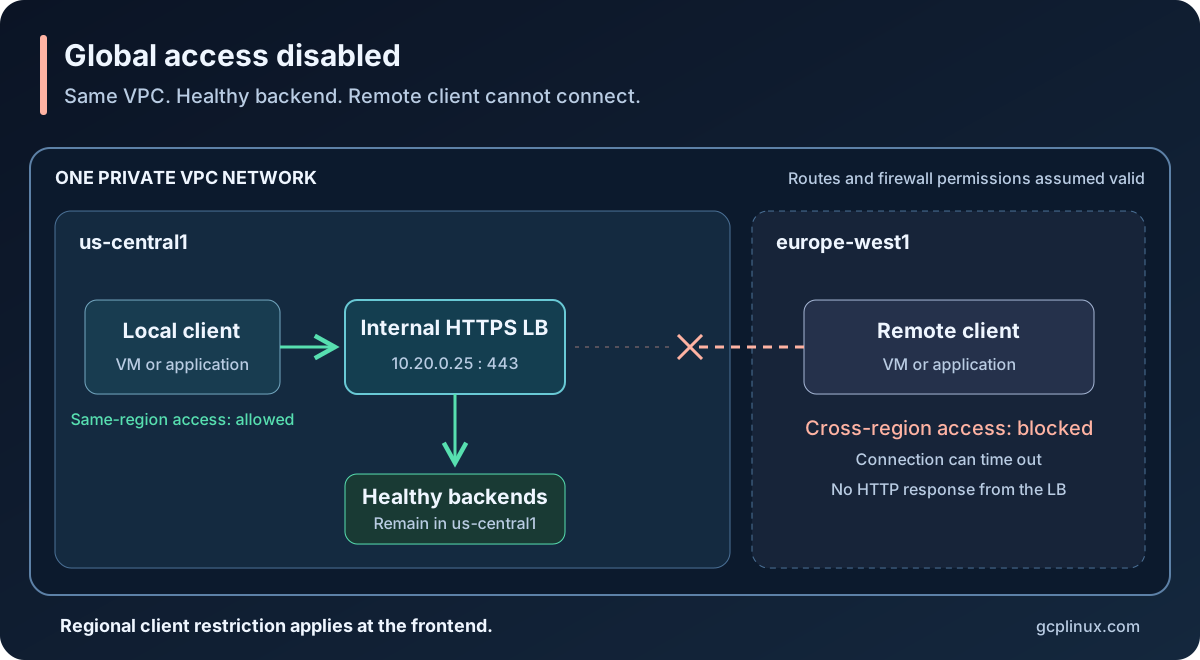
Both clients are in the same VPC. The regional access restriction prevents the remote client's connection even though the backend is healthy.
With global access
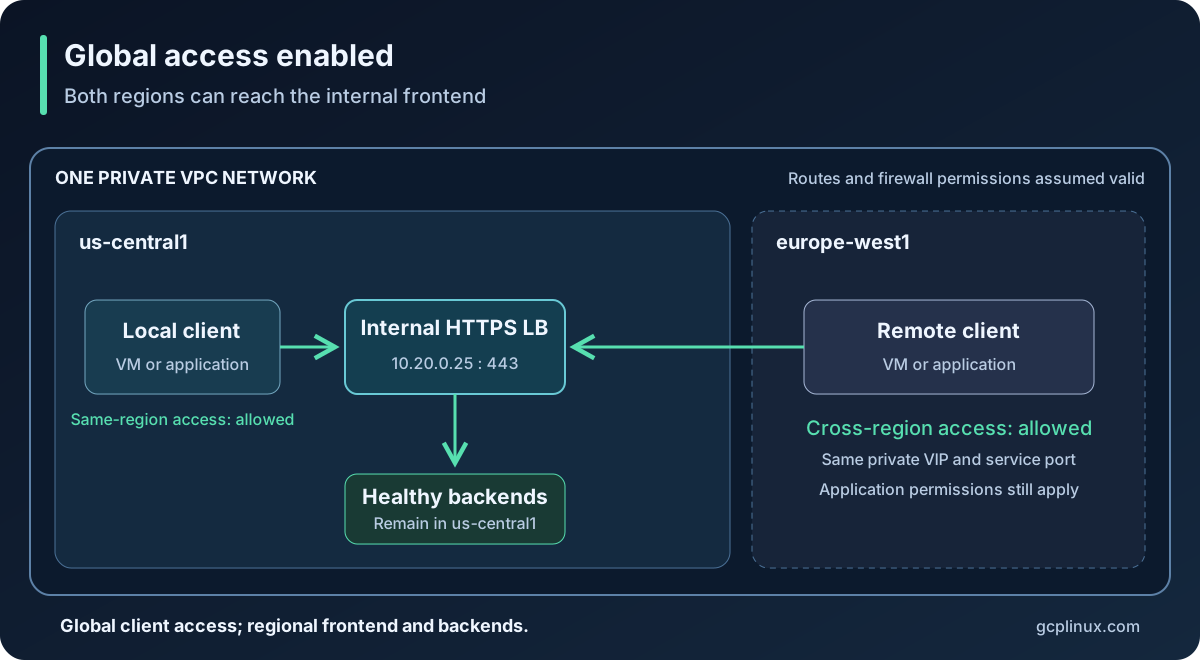
The remote client can now reach the frontend, assuming the rest of the network path permits it. Global client access does not turn regional backends into a cross-region deployment. The internal proxy Network Load Balancer overview distinguishes regional backends from the global backend scope and failover capabilities of cross-region mode.
Which internal load balancers support it?
| Load balancer type | Deployment mode | Global access behavior |
|---|---|---|
| Internal Application Load Balancer (HTTP/HTTPS) | Regional | Optional; disabled by default; create the forwarding rule with --allow-global-access |
| Internal Application Load Balancer (HTTP/HTTPS) | Cross-region | Built in; always enabled; cannot be disabled |
| Internal proxy Network Load Balancer (TCP) | Regional | Optional; disabled by default; create the forwarding rule with --allow-global-access |
| Internal proxy Network Load Balancer (TCP) | Cross-region | Built in; always enabled; cannot be disabled |
| Internal passthrough Network Load Balancer (TCP/UDP) | Regional | Optional; disabled by default; supports --allow-global-access on creation or update |
These behaviors are documented in the Application, proxy Network, and passthrough Network load balancer overviews. Passthrough also supports additional protocols; TCP/UDP is the focus here.
Check the forwarding rule first
Replace these example values with your project and the load balancer's region, not the remote client's region:
PROJECT_ID="your-project-id"
LB_REGION="us-central1"
FORWARDING_RULE="internal-api-https"

gcloud compute forwarding-rules describe "$FORWARDING_RULE" \
  --project="$PROJECT_ID" \
  --region="$LB_REGION" \
  --format="yaml(name,IPAddress,IPProtocol,ports,loadBalancingScheme,region,allowGlobalAccess,target,backendService)"
For a regional rule, allowGlobalAccess: true confirms that access is enabled. A false or unset value does not establish global access. INTERNAL_MANAGED alone does not distinguish Application from proxy Network Load Balancers: inspect whether the target is an HTTP(S) or TCP proxy. An INTERNAL rule pointing to a backend service identifies the passthrough case covered here. The forwarding-rule API reference describes these fields.
Cross-region Application and proxy Network Load Balancers use global forwarding rules. Inspect those with --global instead of --region; do not diagnose their built-in access behavior by looking for a regional toggle.
In-place update or recreation: what actually changes?
| Internal load balancer | Can global access be changed in place? | Required change |
|---|---|---|
| Regional Application (HTTP/HTTPS) | No | Replace the forwarding rule |
| Regional proxy Network (TCP) | No | Replace the forwarding rule |
| Regional passthrough Network (TCP/UDP) | Yes | Update the existing forwarding rule |
| Cross-region Application/proxy Network | No configurable toggle | Already enabled |
For regional Application/proxy load balancers, keep the existing target proxy, URL map where applicable, backend service, and backends. Create the replacement forwarding rule pointing to that proxy. Google's frontend replacement instructions describe this scope of change.
Warning: preserve the VIP deliberately and plan for interruption
- An ephemeral IP is not a preservation guarantee. A replacement can receive a different VIP. Preserve a required address as a reserved static internal IP before deleting the old rule, and reference that address explicitly in the replacement. Keep the address resource out of the destruction plan.
- A reserved VIP does not guarantee uninterrupted service. Replacing the rule on the same VIP, port, and protocol requires removing the conflicting frontend first. Requests can fail during that gap, and established connections can be lost. Schedule a maintenance window when this is the chosen approach.
- A second VIP allows validation before cutover. Create and test the new frontend while the old one remains available, then switch private DNS or client configuration. Account for DNS caching, connection pools, hardcoded IPs, and any IP-based allowlists before retiring the old rule.
- Shared VIPs have additional constraints. Sharing an address across compatible forwarding rules requires
SHARED_LOADBALANCER_VIP; it does not permit duplicate frontend IP/port/protocol combinations. See the shared-address requirements.
For Terraform, inspect the plan for forwarding-rule replacement and any address destruction. If only global access is changing, investigate a plan that also replaces proxies, backend services, or backends before applying it. Neither a successful apply nor retaining the VIP guarantees that existing connections survive.
Fix it with gcloud
Use the configuration owner for the change. If Terraform manages the rule, make the change there instead of introducing an out-of-band gcloud change. If a Kubernetes controller owns it, change the controller's supported configuration.
Regional internal Application Load Balancer
Create a new frontend pointing to the existing regional HTTPS proxy. This example assumes the VPC, frontend subnet, proxy, certificate, and healthy backends already exist. Reserve an unused internal IP in that subnet for the new frontend:
gcloud compute addresses create internal-api-global-vip \
  --project="$PROJECT_ID" \
  --region="$LB_REGION" \
  --subnet=app-subnet

gcloud compute forwarding-rules create internal-api-https-global \
  --project="$PROJECT_ID" \
  --region="$LB_REGION" \
  --load-balancing-scheme=INTERNAL_MANAGED \
  --network=app-vpc \
  --subnet=app-subnet \
  --address=internal-api-global-vip \
  --ports=443 \
  --target-https-proxy=internal-api-https-proxy \
  --target-https-proxy-region="$LB_REGION" \
  --allow-global-access
Test the new VIP before moving the private DNS record or client configuration. Leave the old frontend available until the cutover is verified. The regional Application Load Balancer setup guide requires a new forwarding rule for this change.
Regional internal proxy Network Load Balancer
The same replacement requirement applies. For an existing regional TCP proxy serving port 5432, create a new forwarding rule using an unused reserved VIP:
gcloud compute forwarding-rules create internal-tcp-global \
  --project="$PROJECT_ID" \
  --region="$LB_REGION" \
  --load-balancing-scheme=INTERNAL_MANAGED \
  --network=app-vpc \
  --subnet=app-subnet \
  --address=internal-tcp-global-vip \
  --ports=5432 \
  --target-tcp-proxy=internal-tcp-proxy \
  --target-tcp-proxy-region="$LB_REGION" \
  --allow-global-access
Reserve internal-tcp-global-vip in the frontend subnet first, as in the HTTPS example. Use your actual service port. Google's regional proxy Network Load Balancer setup documents this new-rule approach.
Internal passthrough Network Load Balancer
For this type, update the existing forwarding rule:
gcloud compute forwarding-rules update internal-tcp-forwarding-rule \
  --project="$PROJECT_ID" \
  --region="$LB_REGION" \
  --allow-global-access
The gcloud update reference exposes the flag, but its presence does not override the immutability restriction for Application/proxy INTERNAL_MANAGED rules.
Fix it with Terraform
Set the property on the forwarding rule, rather than the backend service:
allow_global_access = trueHere is a regional HTTPS frontend excerpt. Adapt it within your existing configuration; the referenced address, network, subnet, and HTTPS proxy resources must already be defined:
resource "google_compute_forwarding_rule" "https_global" {
  name                  = "internal-api-https-global"
  project               = var.project_id
  region                = var.region
  load_balancing_scheme = "INTERNAL_MANAGED"
  ip_protocol           = "TCP"
  port_range            = "443"
  network               = google_compute_network.app.id
  subnetwork            = google_compute_subnetwork.app.id
  ip_address            = google_compute_address.new_internal_vip.address
  target                = google_compute_region_target_https_proxy.app.id
  allow_global_access   = true
}
For a regional proxy Network Load Balancer, use the regional TCP proxy as target and the intended TCP port. For a passthrough frontend, the resource instead points directly to a backend service:
resource "google_compute_forwarding_rule" "tcp" {
  name                  = "internal-tcp-forwarding-rule"
  project               = var.project_id
  region                = var.region
  load_balancing_scheme = "INTERNAL"
  ip_protocol           = "TCP"
  ports                 = ["5432"]
  network               = google_compute_network.app.id
  subnetwork            = google_compute_subnetwork.app.id
  backend_service       = google_compute_region_backend_service.tcp.id
  allow_global_access   = true
}
These are frontend excerpts, not complete load balancer deployments. For an existing Terraform-managed rule, edit its existing resource block. The provider resource documentation documents allow_global_access and the target/backend-service fields.
Review a fresh plan using your project's pinned provider:
terraform fmt -check
terraform validate
terraform plan -out=global-access.tfplan
terraform show global-access.tfplan
For an existing INTERNAL_MANAGED rule, expect replacement. The provider implementation explicitly forces recreation when this setting changes for that scheme. Older provider behavior can differ; an in-place plan does not make an immutable API field mutable.
A separate rule with a new name and reserved VIP lets you test before switching clients. Keeping the same VIP/port requires a carefully planned replacement: do not assume create_before_destroy can create a duplicate frontend tuple or reuse the same resource name. Review any destruction and expected interruption before applying:
terraform apply global-access.tfplanKeep saved plans private and apply the reviewed plan only while it is current.
Verify from both regions
Run the same test from a client beside the load balancer and from the previously failing region. For HTTPS, preserve the hostname and TLS SNI while selecting the VIP explicitly:
VIP="10.20.0.25"
HOSTNAME="api.internal.example.com"

curl --noproxy '*' \
  --connect-timeout 5 \
  --max-time 15 \
  --resolve "${HOSTNAME}:443:${VIP}" \
  --verbose \
  "https://${HOSTNAME}/health"
Replace the VIP, hostname, and path. Use the new VIP when testing a replacement frontend. If the service uses a private CA, supply its trusted certificate with --cacert; keep certificate verification enabled. Curl's manual documents --resolve, connection timeouts, proxy bypass, and CA selection.
For a TCP service, an available nc implementation can check the connection with nc -vz -w 5 10.20.0.25 5432. Follow that with the real protocol client: a successful TCP connection does not prove authentication or application behavior. UDP needs a protocol-aware request and response; an empty UDP probe is not reliable confirmation.
Confirm the intended application response from both regions, then repeat using the normal DNS name. If the connection still fails, check the resolved VIP, client network path, firewall policy, frontend port, and backend health. For a Cloud Run caller, also verify its VPC egress path. Healthy backend probes alone do not prove that a remote client can reach the frontend.
The regional split is the clue: when an internal service works locally and times out from another region, inspect the forwarding rule before treating the timeout as an application problem.