Cloud Run is serverless, but the applications running on it often need to reach resources that should stay on private networks: a database, an internal API, a cache, or a service in another environment. Direct VPC egress gives a Cloud Run service or job a direct outbound path into a VPC network without creating a Serverless VPC Access connector.
This guide explains the traffic flow, when to use it, the tradeoffs, and how to configure it in a standalone project or a Shared VPC environment. The examples use Cloud Run services and Google Cloud CLI. Review the project, network, subnet, image, and region values before using any command.
Start with the traffic direction
Direct VPC egress is an outbound connection from a Cloud Run workload to a VPC. It does not, by itself, make a Cloud Run service privately reachable from a client or a VM. A client request still reaches a service through its normal Cloud Run URL or configured load balancer; code in the running container can then open a connection through the VPC interface to a private destination.
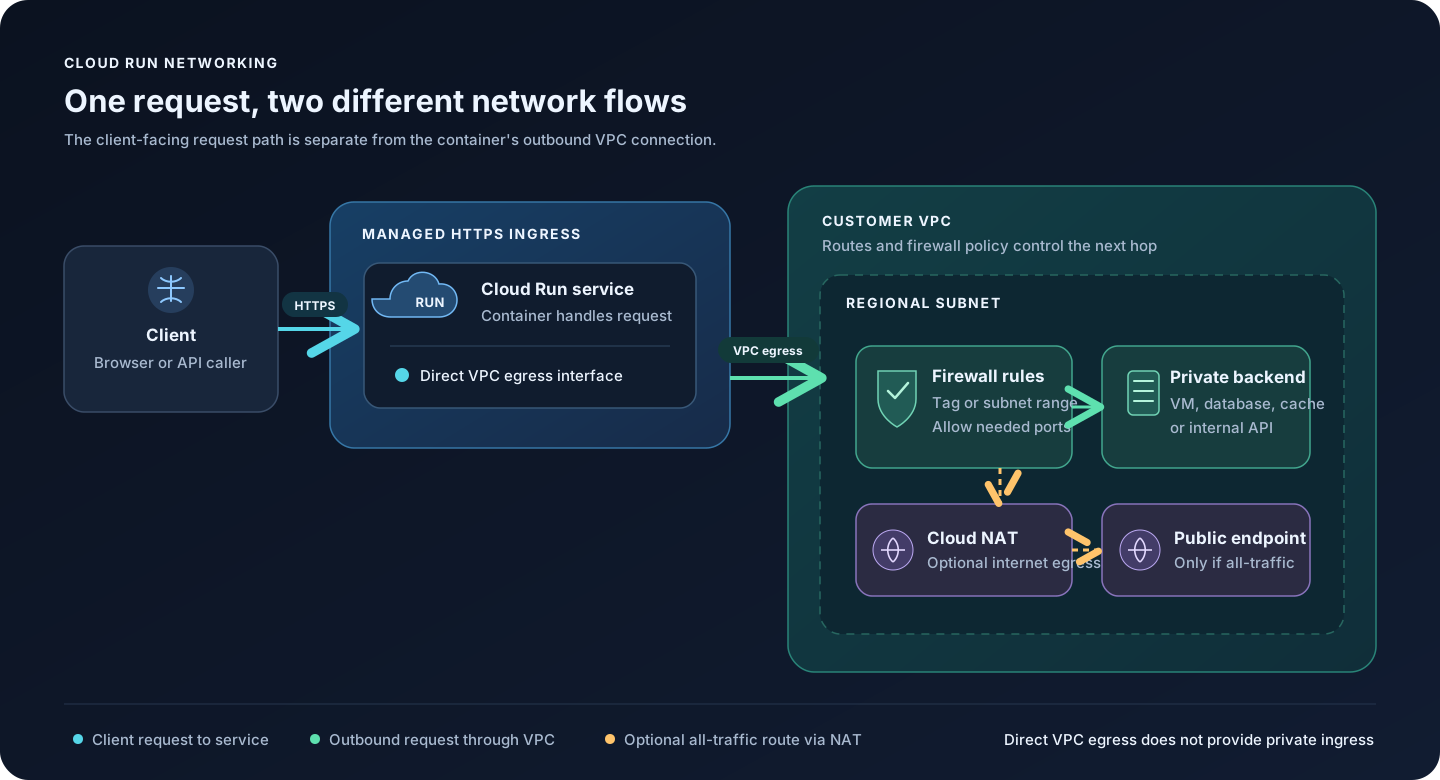
The diagram shows two distinct directions:
- Request path: the client calls the Cloud Run service's HTTPS endpoint. Cloud Run handles the request and returns a response through the managed service endpoint.
- Egress path: while processing a request (or running a job), the container opens a new connection. With Direct VPC egress enabled, selected outbound traffic uses a VPC subnet and is then subject to VPC routes, firewall policy, and the destination's own controls.
If you need VPC workloads to initiate requests into a Cloud Run service, plan a separate ingress design such as an internal Application Load Balancer. Direct VPC egress alone is not that design.
What Direct VPC egress does
Direct VPC egress attaches Cloud Run's outbound networking to a VPC network and subnet. Cloud Run allocates private IP addresses from the selected subnet for the workload. A Serverless VPC Access connector is not required.
For Cloud Run services and jobs, this feature provides egress. Cloud Run worker pools and instances have additional Direct VPC ingress capabilities, but those are different resource types and outside this service-focused walkthrough. See Google's Direct VPC networking guide for the current resource matrix and configuration options.
Two settings decide which traffic uses the VPC:
| Egress setting | What it routes through the VPC | Typical use |
|---|---|---|
private-ranges-only | Requests to internal IP ranges | Reach private VM, database, cache, or internal API destinations while leaving ordinary public egress on Cloud Run's default path. |
all-traffic | All outbound requests | Centralize outbound routing or filtering in the VPC, or use Cloud NAT when public destinations must see a controlled external IP. |
The name private-ranges-only is a routing choice; it does not create firewall permission to a destination. Network routes must exist and firewall policy must allow the specific protocol and port. With all-traffic, design the VPC's internet egress path too. For example, a private subnet generally needs Cloud NAT and the required routes/firewall policy for workloads to reach public endpoints.
When it is useful
Direct VPC egress is a good fit when a Cloud Run service or job needs to initiate connections to:
- A VM or internal service that has no public endpoint.
- A private database or cache, such as a database hosted on Compute Engine or a compatible managed service reachable through the VPC.
- An internal load balancer or a private API hosted in the same or a connected VPC.
- A destination in another network reachable through Cloud VPN, Cloud Interconnect, or an established peering/routing design.
- Public services through a VPC egress path when you need centralized routing or a static egress IP using Cloud NAT.
Use it when VPC firewall rules, routes, or subnet-level network controls are part of the design. For destinations that only have a public endpoint and do not need centralized VPC egress, adding VPC routing may add configuration without helping the application.
Benefits and tradeoffs
Why teams choose it
- No connector fleet to create or size. Direct VPC egress removes the Serverless VPC Access connector resource from this path.
- VPC-native routing and controls. The outbound traffic can use VPC routes and firewall rules to reach internal destinations.
- Revision-level network tags for services. You can associate network tags with a service revision and target egress firewall rules more specifically. Treat tag names as security-sensitive configuration and verify which revisions have them.
- Scale-to-zero friendly. Google documents Direct VPC networking costs as scaling to zero along with the Cloud Run workload. Cloud NAT and other network resources have their own costs, so compare the whole path rather than assuming the design is free.
- One subnet can serve multiple workloads. That can make address planning and firewall administration simpler, provided the subnet has enough capacity and the security boundaries are intentional.
What to plan for
- Subnet IP capacity: Cloud Run IPs are ephemeral. Do not allowlist individual allocated IPs. Google's guidance says an IPv4 subnet must be
/26or larger for Direct VPC egress; services and worker pools can use roughly twice as many addresses as active instances at steady state, with additional headroom needed during revisions and scale changes. Size against peak instances, concurrent revisions, and other subnet users. - Startup and connection behavior: an instance can take a minute or more to establish an egress connection during startup. Use a startup probe that tests a required dependency, with retries or suitable thresholds. Connections can also reset during network maintenance, so clients should retry safely.
- Cloud NAT cold starts: Google documents that Cloud NAT with Direct VPC egress can add 30 seconds or more to some cold starts. Test this path under realistic startup conditions.
- Per-instance throughput: the current documented Direct VPC egress limit is up to 1 Gbps per container instance; higher demand can be throttled. Check current quotas and product limits before choosing it for high-throughput workloads.
- Observability gaps: VPC firewall rule logging and Packet Mirroring are not supported for Direct VPC egress, and VPC Flow Logs do not identify the Cloud Run revision. Check current limitations if your audit or incident response depends on those details.
- Other inspection limits: Google's current documentation lists some Cloud Next Generation Firewall Enterprise egress inspection features, including TLS inspection and URL filtering, as unsupported for this path.
- Regional coupling: use a subnet in the same region as the Cloud Run service. Moving the service to another region means choosing a compatible subnet there.
Limits and behavior can change. Before a production rollout, check Google's live limitations and IP allocation guidance and Cloud Run quotas.
The product details and role names in this draft were checked against Google's documentation on November 3, 2026. Recheck these sources before using the commands in a production project.
Before you deploy
Collect these values and confirm them with the project and network owners:
| Value | Example placeholder | Check |
|---|---|---|
| Cloud Run project | APP_PROJECT_ID | Billing and Cloud Run APIs are available; confirm organization policies. |
| Region | REGION | The Cloud Run service and subnet are in the same region. |
| VPC network | VPC_NETWORK | Correct standalone network or attached Shared VPC network. |
| Subnet | SUBNET_NAME | Has enough free addresses for peak scale, deployments, and other consumers. |
| Container image | IMAGE_URL | Image exists in Artifact Registry and the deployer can read it. |
| Artifact Registry location | AR_LOCATION | Use the repository's actual location; it does not have to match the Cloud Run region. |
| Runtime service account | RUNTIME_SERVICE_ACCOUNT | The deployer can attach it; it has only the application permissions it needs. |
| Egress choice | private-ranges-only or all-traffic | Decide whether public destinations should also use the VPC. |
| Network tag | cloudrun-egress | Optional; define firewall targeting before relying on it. |
| Destination | hostname/IP and port | Confirm route, protocol, firewall direction, DNS, and destination-side policy. |
IAM roles are for different identities
Avoid mixing up the person deploying the service, the service's runtime identity, and Cloud Run's service agent:
- Deployer: generally needs
roles/run.developeron the Cloud Run service,roles/iam.serviceAccountUseron the runtime service account being attached, androles/artifactregistry.readeron the image repository when deploying a prebuilt image. Additional permissions may be needed for project/API setup or network selection. See Cloud Run deployment roles. - Runtime service account: this is the identity your application uses when calling Google APIs. Grant it application roles such as database access only when the application needs them. It is not the identity that allocates the VPC interface.
- Cloud Run service agent: the service agent is a Google-managed account in the Cloud Run project, usually
service-PROJECT_NUMBER@serverless-robot-prod.iam.gserviceaccount.com. The defaultroles/run.serviceAgentnormally includes the permissions needed for a standalone VPC. Do not remove that role. If using custom service-agent permissions or external IPv6, follow the current Direct VPC IAM requirements exactly; IPv6 subnet setup can requireroles/compute.publicIpAdminas well.
The most important troubleshooting check is that the Cloud Run service agent still has its service-agent role and the permissions it needs for the network/subnet. Do not grant Owner or Editor as a shortcut.
Network and firewall checklist
- Enable the Compute Engine API for the relevant project(s); the Cloud Run API must also be enabled to deploy services.
- Use an existing VPC and subnet, or create them through your normal network change process. Confirm the subnet region matches the service region and that its range is large enough.
- Confirm VPC routes lead to the destination. For a connected on-premises network, verify the VPN/Interconnect route exchange and return route as well.
- Allow only the required destination, protocol, and port. VPC firewall rules are stateful, but still verify how the destination and any host firewall handle return traffic.
- For egress firewall rules, Google supports targeting the Cloud Run service/job using its linked service account, subnet IP range, or associated network tags. Network tags can be useful for a narrower rule; use the subnet range when a rule must match the source IP range.
- For a VM receiving traffic from Cloud Run, an ingress rule on the VPC destination may be needed. For a Cloud Run service making an outbound connection, an egress rule may be needed if your egress policy blocks it. There is no single universal firewall command; scope it to your destination and policy.
- For
all-traffic, ensure the VPC has the intended egress route. If internet access should leave a private subnet with a stable public source IP, configure and test Cloud NAT and its Cloud Router before moving traffic. - Check organization policies, including any
run.allowedVPCEgressrestriction, and any policy limiting which Shared VPC subnets the service project can use.
Set up a standalone VPC
This example assumes the VPC and subnet already exist, the image is built, and a deployer has permission to deploy the service.
1. Set project and enable APIs
gcloud config set project APP_PROJECT_ID
gcloud services enable run.googleapis.com compute.googleapis.com
Confirm the active project before continuing:
gcloud config get-value project2. Check the subnet
gcloud compute networks subnets describe SUBNET_NAME \
  --region=REGION \
  --format='yaml(name,network,ipCidrRange,region,privateIpGoogleAccess)'
Confirm that the network and subnet are the intended ones, that the region matches, and that there is sufficient address capacity. A /26 is the documented minimum IPv4 range for Direct VPC egress, not a guarantee that a busy or frequently redeployed service will fit in that subnet.
3. Deploy with Direct VPC egress
For a first private-resource use case, private-ranges-only is often the smaller routing change. This command creates or updates a Cloud Run service and a new revision:
gcloud run deploy SERVICE_NAME \
  --image=AR_LOCATION-docker.pkg.dev/APP_PROJECT_ID/REPOSITORY/IMAGE:TAG \
  --region=REGION \
  --network=VPC_NETWORK \
  --subnet=SUBNET_NAME \
  --vpc-egress=private-ranges-only \
  --network-tags=cloudrun-egress
Replace every uppercase placeholder. The --network-tags flag is optional; omit it if you are not using a matching network tag in an egress firewall rule. For a service that must route all outbound traffic through the VPC, use --vpc-egress=all-traffic only after the VPC route, firewall, and (if needed) Cloud NAT path is ready.
4. Verify the deployed revision
gcloud run services describe SERVICE_NAME \
  --region=REGION \
  --format='yaml(spec.template.metadata.annotations,spec.template.spec.containers)'
Inspect the service's Networking tab as well. Confirm the network, subnet, egress mode, and revision configuration. Then test an application request to the intended private destination; a successful deployment alone does not prove that the route, firewall, DNS, or destination service is correct.
Set up Direct VPC egress with Shared VPC
In Shared VPC, the host project owns the VPC and subnets. The service project owns the Cloud Run service. The host project administrator controls which service projects attach and which subnet access is delegated.
If Shared VPC is not already enabled and the service project is not attached, a Shared VPC Admin must do that foundation work. It is organization-level network administration, not a step every Cloud Run developer should perform. Google documents the process in Provision Shared VPC.
1. Confirm host/service project setup
The Compute Engine API must be enabled in the host project and each attached service project. The subnet must be shared with the service project, and it must be in the same region as the Cloud Run service.
gcloud services enable compute.googleapis.com --project=HOST_PROJECT_ID
gcloud services enable run.googleapis.com compute.googleapis.com \
  --project=SERVICE_PROJECT_ID
If a Shared VPC Admin still needs to attach the service project, the gcloud command is:
gcloud compute shared-vpc associated-projects add SERVICE_PROJECT_ID \
  --host-project=HOST_PROJECT_ID
Run that only with the Shared VPC Admin's authorization and after confirming the project IDs. Existing organizations may share all subnets or only selected subnets; confirm this service's subnet is among the shared ones.
2. Grant the Cloud Run service agent access to the shared subnet
The Cloud Run service agent for the service project needs permission to use the subnet in the host project. Google documents two common choices:
- Grant
roles/compute.networkUserto the service project's Cloud Run service agent on the Shared VPC host project; or - Grant
roles/compute.networkVieweron the host project androles/compute.networkUseron only the selected host-project subnet.
The more narrowly scoped subnet-level option can be applied with:
gcloud compute networks subnets add-iam-policy-binding SUBNET_NAME \
  --project=HOST_PROJECT_ID \
  --region=REGION \
  --member="serviceAccount:service-SERVICE_PROJECT_NUMBER@serverless-robot-prod.iam.gserviceaccount.com" \
  --role=roles/compute.networkUser
For the project-level alternative, a Shared VPC administrator can grant the service agent roles/compute.networkUser on the host project:
gcloud projects add-iam-policy-binding HOST_PROJECT_ID \
  --member="serviceAccount:service-SERVICE_PROJECT_NUMBER@serverless-robot-prod.iam.gserviceaccount.com" \
  --role=roles/compute.networkUser
Use the project number for the service project, not the host project, in the service-agent email. Avoid granting both alternatives unless there is a specific reason. Keep roles/run.serviceAgent on the service project; do not assign Google service-agent roles to human users. If the subnet uses external IPv6, check the additional roles/compute.publicIpAdmin requirement in the current documentation.
The person or deployment identity needs permission to deploy the Cloud Run service and attach its runtime service account. The host project's Shared VPC Admin controls project attachment and IAM grants. These are different identities and grants; one does not replace the other.
3. Deploy from the service project
Select the service project, then reference the VPC network and subnet by their fully qualified host-project resource names:
gcloud run deploy SERVICE_NAME \
  --project=SERVICE_PROJECT_ID \
  --image=AR_LOCATION-docker.pkg.dev/SERVICE_PROJECT_ID/REPOSITORY/IMAGE:TAG \
  --region=REGION \
  --network=projects/HOST_PROJECT_ID/global/networks/VPC_NETWORK \
  --subnet=projects/HOST_PROJECT_ID/regions/REGION/subnetworks/SUBNET_NAME \
  --vpc-egress=private-ranges-only \
  --network-tags=cloudrun-egress
The region must match the subnet's region. If using all-traffic, first confirm the host VPC's default routes, firewall policy, Cloud NAT configuration (if needed), and expected public egress behavior.
4. Verify connectivity and least privilege
Check the Cloud Run revision and its network settings. Test from the application to the private endpoint by hostname and port, and inspect Cloud Run logs plus the relevant VPC route/firewall state. If Shared VPC denies access, confirm all of the following before broadening IAM:
- The service project is attached to the intended host project.
- The selected subnet is actually shared with that service project.
- The subnet region equals the Cloud Run region and has free IP capacity.
- The Cloud Run service agent in the service project has the required host-project/subnet permissions.
- Firewall rules allow the required flow and the destination allows return traffic.
- Organization policies do not prohibit the selected subnet or egress mode.
Firewall rules: think about source, destination, and direction
Firewall examples are easiest to get wrong when they use a broad source range or the wrong direction. Start with a flow table before writing a rule:
| Flow | Where the rule applies | What to allow |
|---|---|---|
| Cloud Run service to private VM | VPC egress policy; destination VM ingress policy | Only the destination address/tag, protocol, and port required by the application. |
| Cloud Run service to private managed endpoint | VPC egress policy and service-specific access policy | Required destination and port; also check product-specific authorized networks or IAM controls. |
| Cloud Run through VPN/Interconnect to on-premises | VPC egress policy plus hybrid route/firewall path | Required CIDR/protocol/port in both directions; verify route exchange and on-premises return route. |
| All-traffic egress to public internet through Cloud NAT | VPC egress policy, route, NAT, destination | NAT translates source addresses; ensure the intended route and destination allowlist use the NAT public IP. |
When targeting Cloud Run egress, Google documents use of the service identity, subnet IP range, or associated network tags. Do not use one ephemeral Cloud Run address as a durable allowlist entry. Network tags are revision-level for services, which makes them useful for targeting egress policy for a specific service revision. Conversely, several firewall logging and packet inspection features are not supported for Direct VPC egress; validate observability requirements before adopting it.
Troubleshooting checklist
The service deploys, but a private connection times out
- Verify the selected network/subnet and region on the latest service revision.
- Check whether the destination is actually on a route reachable from that VPC. For hybrid destinations, verify VPN/Interconnect routes in both directions.
- Confirm egress mode. A private destination should use the intended internal range and route.
- Check egress policy, destination ingress firewall, host firewall, port, and protocol. If using a network tag, confirm it is attached to the active revision.
- Check DNS from the service runtime. A correct route does not help if the hostname resolves to a public or incorrect address.
- In Shared VPC, verify service-agent IAM in the host project and that the subnet is shared with the service project.
The service starts slowly or intermittently fails its first request
Use an HTTP startup probe that checks the dependency the service needs before it starts serving traffic. Add bounded retries and timeouts to application clients so transient connection resets do not become failed user requests. Test cold starts separately from steady-state traffic.
Scaling fails with an address exhaustion error
Estimate concurrent instances across both the old and new revisions during rollout, other users of the subnet, and the documented address retention period. Increase subnet capacity or select a suitable larger range through your network change process. Do not assume a /26 supports an arbitrary instance count simply because it meets the documented minimum.
Public internet stops working after choosing all-traffic
That setting deliberately routes all outbound requests through the VPC. Confirm a working default route and Cloud NAT where required, then check firewall policy and NAT allocation/logging. If only private destinations need VPC reachability, private-ranges-only may be the better fit.
A practical rollout plan
- Start with one non-critical service and a test destination.
- Record the current route, VPC, subnet, IAM, firewall, and egress behavior.
- Check subnet capacity for peak scale and overlapping revisions.
- Add only the required service-agent and deployer permissions.
- Configure the destination's minimum required firewall rules.
- Deploy one revision with the selected egress mode and a startup connectivity check.
- Test private and public destinations separately, then test cold start, scale-up, and a revision rollout.
- Compare observed connections and source addresses with the intended routing design.
- Roll out gradually and keep a known-good revision available for rollback.
Key takeaways
- Direct VPC egress lets a Cloud Run service or job initiate outbound connections into a VPC without a Serverless VPC Access connector.
- Choose
private-ranges-onlyorall-trafficbased on which destinations should traverse the VPC. - Design subnet capacity, routing, firewall rules, IAM, DNS, and (for public egress through the VPC) Cloud NAT before deployment.
- Shared VPC requires separate host-project and service-project planning; grant the Cloud Run service agent the narrowest supported access to the shared subnet.
- Treat IPs as ephemeral, build retryable applications, and verify product limitations against Google's live docs before production changes.